Claude Code in true fullscreen: the missing workflow
Updated July 2026 · Disclosure: written by the maker of Sticky for Claude. The Spaces explanation is plain AppKit reality.
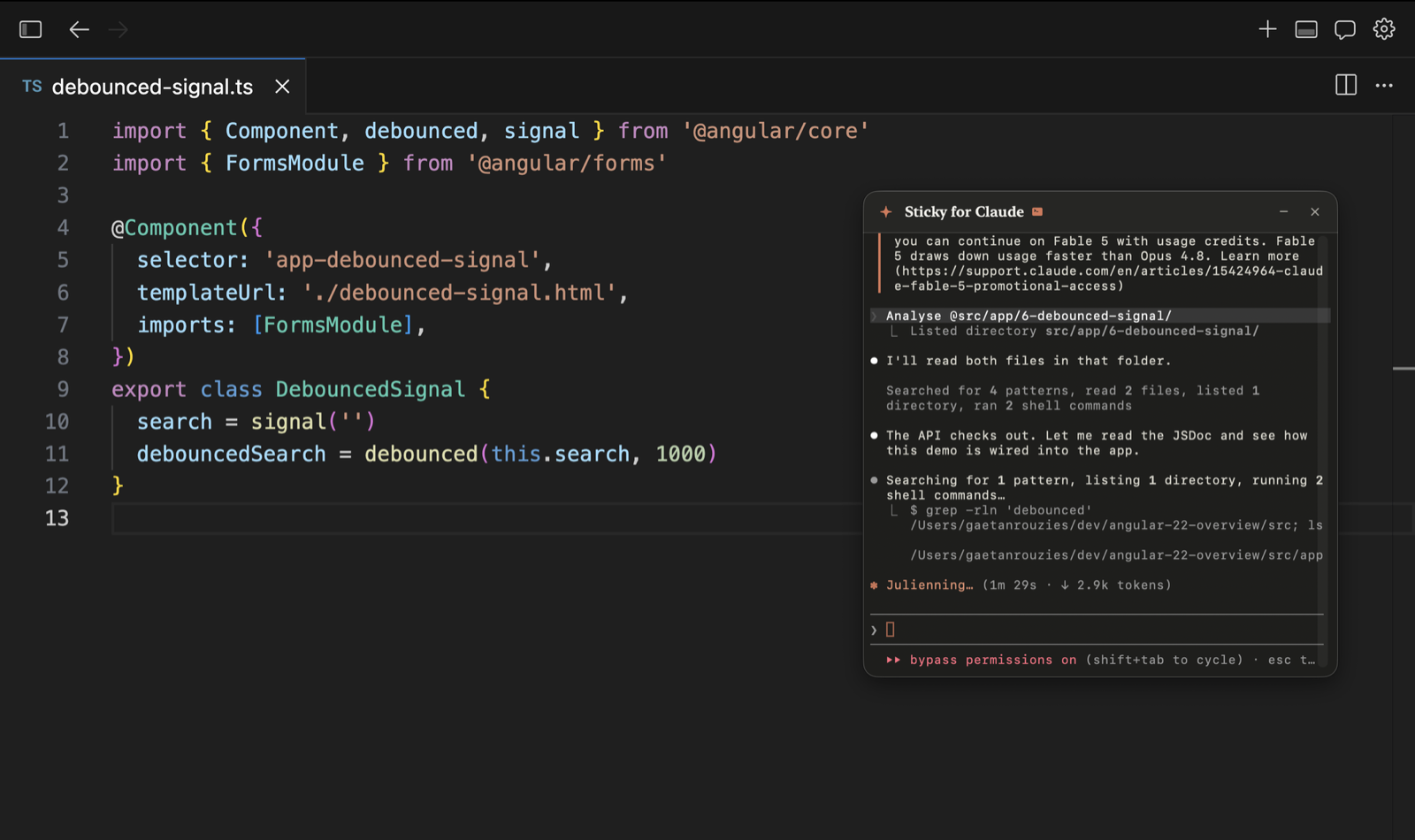
True fullscreen is the best way to focus on macOS: one app, zero chrome, no distractions. It's also the fastest way to lose your Claude Code session, because fullscreen apps get their own Space, and no normal window can appear inside it. The moment you go fullscreen in your IDE, your Claude Code terminal, the official desktop app, and any pinned window all cease to exist visually.
Why fullscreen kills every normal window
People assume "always on top" is a window setting. On macOS it's two separate problems. Window level decides who wins when windows overlap on the same Space. But a fullscreen app lives on its own private Space, and windows don't cross Spaces at all, whatever their level. To appear over a fullscreen app, a window needs the special collection behaviors Apple built for system overlays like Spotlight. Almost no app uses them.
Workflow 1: leave fullscreen (the common surrender)
Most Claude Code users just stop using fullscreen: maximized-but-not-fullscreen windows, tiling, a second monitor. It works, and a second monitor is genuinely the best answer if you have the desk space. But if you like fullscreen focus on a laptop, you're giving up your favorite mode because your tools can't follow you.
Workflow 2: swipe out, ask, swipe back
Keep fullscreen and Cmd-Tab or three-finger-swipe to Claude every time. The cost is invisible but real: each round trip breaks your reading of the code, and when Claude Code waits on a permission prompt, you won't see it. Sessions stall for minutes because a confirmation was sitting on another Space.
Workflow 3: an overlay that joins every Space
The third option is a window built with Spotlight's technique: it joins all Spaces, shows over fullscreen windows, and never steals focus from your editor. That's exactly what Sticky for Claude does, applied to Claude: floating windows that run a Claude chat, a full Claude Code session pinned to your project folder, or a real terminal. They auto-fade when idle so they never cover code, and double-tap ⌘ summons or hides them anywhere. Permission prompts stay visible, so sessions never silently stall.
The honest comparison
| Second monitor | Swipe out and back | Sticky for Claude | |
|---|---|---|---|
| Keeps true fullscreen | Usually replaces it | Yes | Yes |
| Claude Code always visible | Yes | No | Yes |
| Catches permission prompts instantly | Yes | No | Yes |
| Works on a laptop alone | No | Yes | Yes |
| Cost | A monitor | Free (in attention) | $29 once |
Keep fullscreen. Keep Claude Code.
7-day free trial · all features · no account, no card · macOS 14+, Apple Silicon
↓ Download Sticky for ClaudeRelated: How to keep Claude always on top on macOS · Run Claude Code next to your IDE without alt-tabbing